
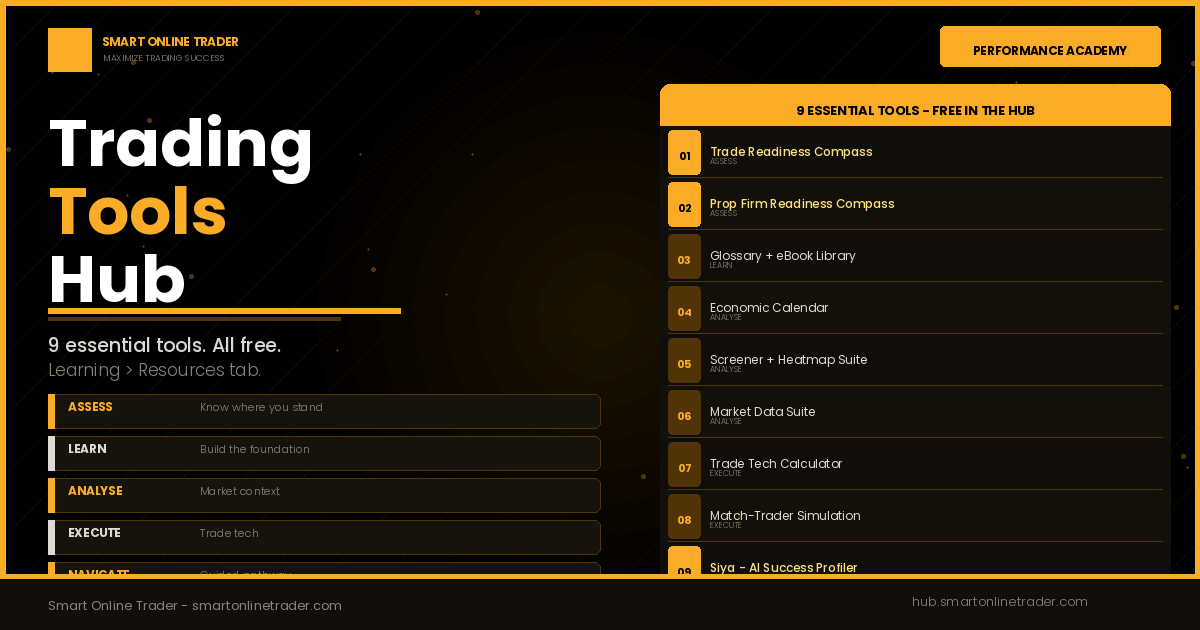
Trading tools are the most oversold and most misunderstood category in the entire online trading industry. Every platform, every vendor, every social media channel has a set of trading tools they claim will change your results, being indicators, signal alerts, scanners, AI assistants, and automated systems that promise to do the thinking for you. The traders who plateau, and most retail traders do, are usually not short of tools. They are short of structure. The right tools do not replace discipline. They reinforce it. This article covers nine essential trading tools available free inside the SOT Community Hub, organised around a structured, five-stage workflow: Assess, Learn, Analyse, Execute, and Navigate. These nine are a curated selection, not the full library. The Hub Resources area is continually expanding, but these are the tools every serious SOT trader should know first.
Why Most Traders Use Trading Tools Wrong
The trading tools industry has a fundamental design problem. Most tools are built to generate signal, being entry alerts, indicator crossovers, and pattern recognition triggers, without addressing the governance layer that determines whether the trader using those signals makes good decisions under pressure.
The result is predictable. A trader with access to a premium signal tool still revenge-trades after a losing session. A trader using an AI-assisted indicator still moves their stop-loss when the position goes against them. A trader running a sophisticated screener still takes setups outside their defined rule set because the opportunity feels compelling in the moment.
The signal is not the problem. The decision-making environment around the signal is the problem.
The SOT trading tools ecosystem is built on a different principle: tools that reinforce structure rather than substitute for judgement. Every resource exists to make one specific part of the governance framework more measurable, more visible, or more honest. To make that practical, the nine essential tools below are mapped to a five-stage workflow that mirrors how a disciplined trader actually operates.
The Governed 5-Stage Workflow: Assess, Learn, Analyse, Execute, Navigate
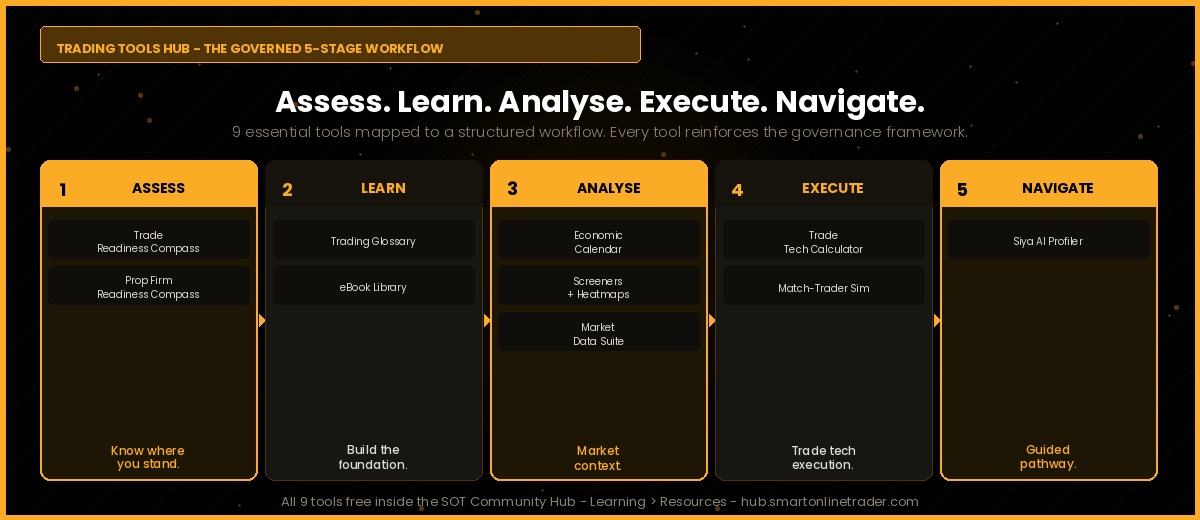
The nine tools are not a random collection of software. They map onto the five stages every structured trader moves through, in order. Assess where you stand. Learn what you do not yet know. Analyse the market with proper context. Execute within a controlled environment. And navigate the journey with guidance. All nine are available free inside the SOT Community Hub, under the Learning tab in the Resources area.
Stage 1 – Assess: Know Where You Stand
Tool 1 – The SOT Trade Readiness Compass
The Trade Readiness Compass is a free interactive assessment built for traders who want an honest diagnosis of their readiness before committing real capital. It covers five domains: knowledge foundation, risk management discipline, psychological governance, consistency and process, and evaluation readiness.
Twenty-five structured questions, three adaptive probes, and a scored verdict in one of four bands: Trade Ready, Conditionally Ready, Still Developing, or Foundation Stage, with a domain-by-domain breakdown showing exactly where the gaps are. It is not a quiz. It is a structural audit, and most traders discover a significant gap between what they know and what they actually apply when they work through it honestly.
Tool 2 – The SOT Prop Firm Trade Readiness Compass
The Prop Firm Trade Readiness Compass is purpose-built for one question: are you ready to attempt, and pass, a prop firm evaluation? It assesses the specific competencies that evaluations test most ruthlessly, including drawdown discipline under pressure, daily loss limit adherence, consistency of execution across a multi-day evaluation window, and the psychological governance required to trade another entity’s capital within strict rules.
A trader who performs well in a relaxed personal account often fails an evaluation not because of strategy, but because the rules introduce a layer of pressure their governance framework was never built to handle. This tool diagnoses that gap before you pay an evaluation fee, not after you have failed and forfeited it. Both Compass tools are free inside the SOT Community Hub under the Learning tab.
Stage 2 – Learn: Build the Foundation
Tool 3 – The Comprehensive Trading Glossary and eBook Library
Inside the Hub Resources area, the Comprehensive Trading Glossary and the eBook Library form the knowledge foundation layer. The Glossary is a searchable reference covering the full vocabulary of trading, from order types and market structure to risk metrics and macroeconomic terms, written in plain language for traders building genuine understanding rather than memorising jargon.
The eBook Library is a curated collection of structured learning material covering strategy, psychology, risk management, and market mechanics. Together they answer the questions a developing trader does not yet know to ask, and they remove the single most common excuse for poor decisions: not actually understanding what you are doing. Both are free in the SOT Community Hub under Learning, in the Resources area.
Stage 3 – Analyse: Build Market Context
Tool 4 – The Economic Calendar
The Economic Calendar provides real-time scheduled economic event data, including interest rate decisions, employment reports, inflation prints, and GDP releases across major economies, each tagged by impact level. For a structured trader operating within a defined session framework, the calendar is not optional. High-impact events create volatility conditions that fall outside most structured setups, and having a written rule for whether you trade through them, reduce position size, or step aside entirely is a governance requirement.
Tool 5 – The Screener and Heatmap Suite
The Hub Resources area includes a full suite of screeners and heatmaps across asset classes: Forex Screener, Forex Cross Rates, and Forex Heatmap for currency markets; Crypto Currency Market and Crypto Heatmap for digital assets; and Stock Screener and Stock Heatmap for equities. These tools let you scan entire markets at a glance, identify relative strength and weakness, and frame your bias with breadth rather than tunnel vision on a single chart. Used within a defined watchlist and rule set, they sharpen analysis without inviting the over-trading that unfiltered scanning often encourages.
Tool 6 – The Market Data Suite
The Market Data Suite rounds out the analysis layer with Market Data, Market Summary Watchlist, and dedicated Market Data feeds for Forex, Crypto, and Indices. This is the macro context layer that elevates technical setups from pattern recognition to informed, thesis-driven trading. A trader who understands where the broad market sits, and how their instrument relates to it, has a structural edge over one trading a single chart in isolation.
Stage 4 – Execute: Trade Tech
Tool 7 – The Advanced Trade Tech Calculator
The Advanced Trade Tech Calculator is the execution-discipline tool. It applies directly to trade execution, risk management, and position sizing, helping you calculate correct lot sizes, define risk per trade as a fixed percentage of account, and translate your written risk rules into precise, repeatable numbers before you place a trade. It is the tool that turns “I will risk one percent” from an intention into an exact, calculated position size.
Tool 8 – Match-Trader via QuickTrade.World
The Match-Trader platform, delivered via QuickTrade.World, is the execution environment for the SOT Performance Lab, being the prop firm evaluation and simulated funded account division. It combines professional-grade order management with full TradingView chart integration, giving traders access to TradingView’s complete indicator library and multi-timeframe analytical depth directly inside the execution interface.
For Performance Lab candidates working through an evaluation, Match-Trader provides the complete simulated trading environment: real market data, accurate simulated execution, and all the analytical tools required to demonstrate governance-compliant performance. The skills and habits developed here transfer directly to any professional trading environment.
Stage 5 – Navigate: Your Guided Pathway
Tool 9 – Siya, Your AI Success Profiler
Siya at present.smartonlinetrader.com is the SOT AI-powered Success Profiler, a three-minute interactive diagnostic that maps your current position against the SOT ecosystem and tells you exactly which pathway fits your starting point, goals, and timeline.
Siya qualifies, guides, and routes. She asks about your experience level, your trading goals, your timeline, and your current position in the development journey, then produces a personalised pathway recommendation pointing you toward the specific SOT resource or next action that matches your situation. For anyone entering the SOT ecosystem for the first time, Siya is the correct starting point. Three minutes, no pressure, a personalised answer.
A Note on AT DeepSight – The Live-Trading Intelligence Layer
Beyond the nine Hub tools, traders who progress to live trading with ATFX SA gain access to a further intelligence resource: AT DeepSight. This is ATFX’s AI-assisted, institutional-grade market analysis covering forex, commodities, indices, and equities, drawing on ATFX SA’s global research infrastructure across nine international licences and five continents.
It is important to be clear about what AT DeepSight is and is not. It is not a SOT Hub tool. It is an exclusive benefit for ATFX clients, available to traders who open and fund a live ATFX account with a minimum deposit of $300. The SOT Hub tools belong to the education and simulation stage of the journey. AT DeepSight, accessed through MT5 with ATFX SA, belongs to the live execution stage. These are two distinct ecosystems, and AT DeepSight sits firmly in the live-trading one. Full details are available at smartonlinetrader.com.
How the 9 Tools Work Together as One System
The nine tools are designed as a sequential, self-reinforcing system that follows the five-stage workflow. You start with Siya, who tells you where to begin. You Assess with the two Compass tools. You Learn through the Glossary and eBook Library. You Analyse with the Economic Calendar, the Screener and Heatmap Suite, and the Market Data Suite. You Execute with the Advanced Trade Tech Calculator and Match-Trader. And throughout, the governance framework keeps every decision measurable and repeatable.
The SOT Community Hub is the access layer for all nine tools, available free under the Learning tab in the Resources area. Membership is completely complimentary. Not a trial, not a freemium tier, complimentary, because the access barrier to a professional trading infrastructure should be commitment, not cost. And these nine are only the beginning. The Resources library is continually expanding.
Frequently Asked Questions
Are all nine trading tools really free?
Yes. All nine tools are available at no cost to SOT Community Hub members, accessible under the Learning tab in the Resources area. Hub membership itself is completely complimentary, with no subscription, no trial period, and no payment required. These nine are a curated selection of the essentials. The full Resources library contains more, and it is continually expanding.
What is the difference between the Trade Readiness Compass and the Prop Firm Trade Readiness Compass?
The Trade Readiness Compass assesses your overall readiness to trade live capital across five broad domains. The Prop Firm Trade Readiness Compass is purpose-built for one specific question: are you ready to attempt and pass a prop firm evaluation? It focuses on the exact competencies evaluations test, including drawdown discipline, daily loss limit adherence, multi-day consistency, and the psychological governance of trading within strict rules. If your goal is the Performance Lab evaluation specifically, start with the Prop Firm Trade Readiness Compass. Both are free under the Learning tab.
What does the Advanced Trade Tech Calculator do?
The Advanced Trade Tech Calculator applies to trade execution, risk management, and position sizing. It helps you calculate correct lot sizes, define risk per trade as a fixed percentage of your account, and translate your written risk rules into precise, repeatable numbers before you place a trade. It turns risk intentions into exact calculated positions, which is a core discipline of governance-led trading.
Is AT DeepSight a SOT Hub tool?
No. AT DeepSight is not a SOT Hub tool. It is an exclusive benefit for ATFX clients, produced by ATFX SA, formally AT Global Markets SA (Pty) Ltd, an Authorised Financial Services Provider, FSP No. 44816. It is available to traders who open and fund a live ATFX account with a minimum deposit of $300. The nine SOT Hub tools belong to the education and simulation stage, while AT DeepSight belongs to the live execution stage with ATFX SA on MT5. Details are available at smartonlinetrader.com.
What is the Performance Lab and how does Match-Trader relate to it?
The Performance Lab is SOT’s prop firm evaluation and simulated funding division. Match-Trader, delivered via QuickTrade.World, is the platform used within the Performance Lab for evaluations and simulated funded accounts. It is not used for live trading. Live trading is conducted via ATFX SA on MT5. These are two distinct ecosystems serving two purposes: simulation and evaluation on Match-Trader via QuickTrade.World, and live execution on MT5 with ATFX SA.
Do I need to be an experienced trader to use these tools?
No. The assessment tools, being the two Compass tools, and the knowledge tools, being the Glossary and eBook Library, are specifically designed to be most useful to traders at the beginning or middle stages of their development. They diagnose what you do not yet have in place and build the foundation you need. Experienced traders use the analysis and execution tools most actively, but all nine provide value regardless of experience level.
How do I get access to all nine tools?
All nine tools are accessible through the SOT Community Hub, under the Learning tab in the Resources area. Joining is free and takes under two minutes. The fastest starting point is to talk to Siya first, who will map your pathway and tell you which tools to prioritise based on your specific situation.
Start with Siya. Three minutes. Your personalised pathway, mapped.
Talk to Siya – Find Your Pathway
Access all 9 tools free. Join the SOT Community Hub.
Ready for your prop firm evaluation?
IMPORTANT DISCLAIMER
Smart Online Trader and its employees are not licensed Financial Services Providers (FSPs) and do not provide financial, investment, or retirement planning advice. The content of this article is intended for educational and informational purposes only and does not constitute financial advice, investment recommendations, or a solicitation to buy or sell any financial instrument. Online trading and prop firm trading involves substantial risk of loss and is not suitable for all individuals. Never trade with money you cannot afford to lose. Always consult a licensed Financial Services Provider, a qualified financial advisor, or your registered broker before making any trading or investment decision.
Francois du Plessis operates as an Authorised Representative under supervision of AT Global Markets SA (Pty) Ltd, an Authorised Financial Services Provider, FSP No. 44816, Registration No. 2013/129459/07.
